
For a while I’ve been bugged over the location of the Plex database. For me, Plex runs on a WD PR4100 so none of the usual locations ever worked. However, I stumbled across a post that gave a good location for the back-up of the database.
In the “Scheduled Tasks” section of the Plex settings there is the option to set the database backup location. Obviously, I’m not going to change it (I’m not looking for trouble) but it does let me see where the backups are located. In my case they’re stored in:
/mnt/HD/HD_a2/Nas_Prog/plex_conf/Plex Media Server/Plug-in Support/DatabasesNow, all I have to do is create a plex directory on my desktop and copy the backup files into the local directory:
scp "sshd@mycloudpr4100.local:/mnt/HD/HD_a2/Nas_Prog/plex_conf/Plex\ Media\ Server/Plug-in\ Support/Databases/*" ~/Desktop/plexFrom here it’s a pretty trivial task to start poking around with the data. I like to use TablePlus because it’s just so nice to use. Use com.plexapp.plugins.library.db as the database and you’re good to go.
There are a few interesting tables that let me link the asset data together:
media_items - metadata_item_id
media_parts - media_item_id
media_streams - media_item_id
metadata_items - id
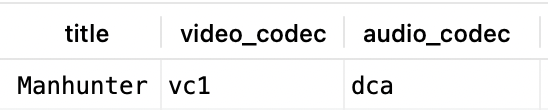
What I’m really interested in though is finding out what codecs are associated with various films. Using Manhunter for example, using a query of:
select metadata_items.title, media_items.video_codec, media_items.audio_codec
from media_items
join metadata_items
on media_items.metadata_item_id = metadata_items.id
where media_items.library_section_id = 1
and metadata_items.title = "Manhunter";
Returns values of:
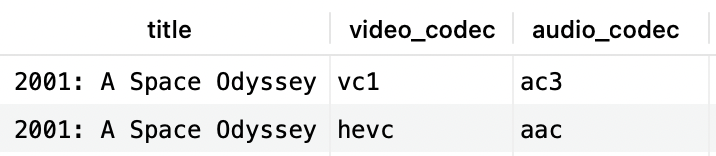
Whereas a similar query for 2001:
select metadata_items.title, media_items.video_codec, media_items.audio_codec
from media_items
join metadata_items
on media_items.metadata_item_id = metadata_items.id
where media_items.library_section_id = 1
and metadata_items.title = "2001: A Space Odyssey";
returns:
If changing the audio from DTS 5.1 to PCM fixed the buffering issue on Manhunter maybe, just maybe, that’s an issue with other films too. A quick query to find films with dcd audio:
select metadata_items.title, media_items.video_codec, media_items.audio_codec
from media_items
join metadata_items
on media_items.metadata_item_id = metadata_items.id
where media_items.library_section_id = 1
and media_items.audio_codec = "dca";
Shows a lot of films that I’ve watched without issue. Maybe it’s both the audio and video codecs that matter? Trying a query of:
select metadata_items.title, media_items.video_codec, media_items.audio_codec
from media_items
join metadata_items
on media_items.metadata_item_id = metadata_items.id
where media_items.library_section_id = 1
and media_items.audio_codec = "dca"
and media_items.video_codec = "vc1";
Also returns a lot of films I’ve successfully watched, however, “The Big Lebowski” is in this list and that never seems to work using the MKV version. I always end up using the MP4 version of the film. So, it’s possible that the films I think I’ve watched I have but only the MP4 version and not the MKV version. Maybe, if I try the MKV version they’d all fail? Time to find out.