
Plex Database

For a while I’ve been bugged over the location of the Plex database. For me, Plex runs on a WD PR4100 so none of the usual locations ever worked. However, I stumbled across a post that gave a good location for the back-up of the database.

In the “Scheduled Tasks” section of the Plex settings there is the option to set the database backup location. Obviously, I’m not going to change it (I’m not looking for trouble) but it does let me see where the backups are located. In my case they’re stored in:

/mnt/HD/HD_a2/Nas_Prog/plex_conf/Plex Media Server/Plug-in Support/Databases

Now, all I have to do is create a plex directory on my desktop and copy the backup files into the local directory:

scp "sshd@mycloudpr4100.local:/mnt/HD/HD_a2/Nas_Prog/plex_conf/Plex\ Media\ Server/Plug-in\ Support/Databases/*" ~/Desktop/plex

From here it’s a pretty trivial task to start poking around with the data. I like to use TablePlus because it’s just so nice to use. Use com.plexapp.plugins.library.db as the database and you’re good to go.

There are a few interesting tables that let me link the asset data together:

media_items - metadata_item_id
media_parts - media_item_id
media_streams - media_item_id
metadata_items - id

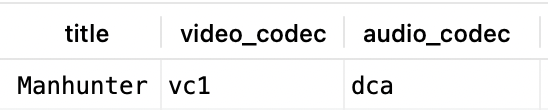
What I’m really interested in though is finding out what codecs are associated with various films. Using Manhunter for example, using a query of:

select metadata_items.title, media_items.video_codec, media_items.audio_codec
from media_items
join metadata_items
on media_items.metadata_item_id = metadata_items.id
where media_items.library_section_id = 1
and metadata_items.title = "Manhunter";

Returns values of:
Whereas a similar query for 2001:

select metadata_items.title, media_items.video_codec, media_items.audio_codec
from media_items
join metadata_items
on media_items.metadata_item_id = metadata_items.id
where media_items.library_section_id = 1
and metadata_items.title = "2001: A Space Odyssey";

returns:
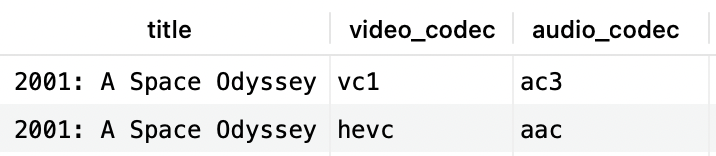
If changing the audio from DTS 5.1 to PCM fixed the buffering issue on Manhunter maybe, just maybe, that’s an issue with other films too. A quick query to find films with dcd audio:

select metadata_items.title, media_items.video_codec, media_items.audio_codec
from media_items
join metadata_items
on media_items.metadata_item_id = metadata_items.id
where media_items.library_section_id = 1
and media_items.audio_codec = "dca";

Shows a lot of films that I’ve watched without issue. Maybe it’s both the audio and video codecs that matter? Trying a query of:

select metadata_items.title, media_items.video_codec, media_items.audio_codec
from media_items
join metadata_items
on media_items.metadata_item_id = metadata_items.id
where media_items.library_section_id = 1
and media_items.audio_codec = "dca"
and media_items.video_codec = "vc1";

Also returns a lot of films I’ve successfully watched, however, “The Big Lebowski” is in this list and that never seems to work using the MKV version. I always end up using the MP4 version of the film. So, it’s possible that the films I think I’ve watched I have but only the MP4 version and not the MKV version. Maybe, if I try the MKV version they’d all fail? Time to find out.
Plex Problems

I use Plex as my back-end video serving platform. I’d love to switch to Jellyfin but not everything in the house has a Jellyfin client and I don’t want to use a mish-mash of multiple platforms because that just makes support a nightmare.

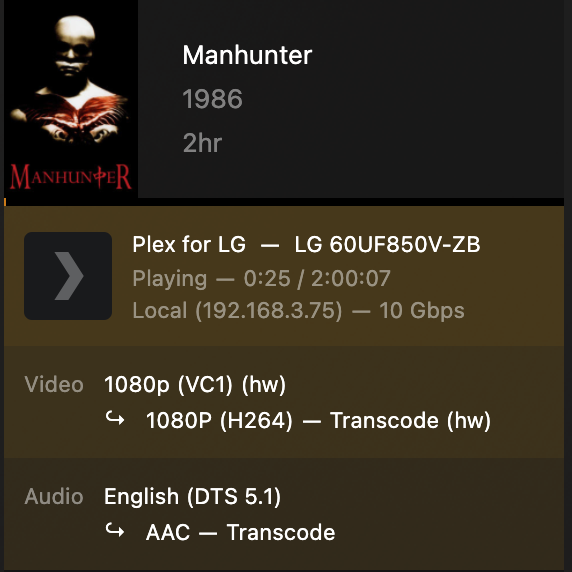
Anyhow, the other day I was watching Manhunter and it kept buffering. The TV in the back room is an old LG TV (LG 60UF850V-ZB). I know from past experience LG don’t seem to support DTS-HD MA 5.1 audio streams but, generally, I’ve not found any issues with DTS 5.1 streams. In the case of Manhunter though the stream kept buffering for no obviously good reason.

Looking at the activity in Plex I could see it was transcoding but it wasn’t making any sense as to why:

Taking a wild punt on the path of least effort, changing the audio to PCM seemed to fix the problem. and Manhunter played out just fine afterwards, no buffering or anything.

Tiring

I find it really annoying that every single time I plug my iPhone into my Mac to sync my music it ask me to trust the computer. I only ever use the one computer, just stop asking me, alright? I mean, sure it isn’t that hard, is it?

Apparently it is. Fortunately, somebody appears to have figured it out: https://www.fireebok.com/resource/fix-iphone-constantly-asking-to-trust-computer-and-enter-password.html

I haven’t tried it yet because I hate resetting things on my phone and given that it’s been working fine for ages (aside from the whole trust issue) I’m slightly reticent to try the proposed solution.

I guess I’ll just have to wait and see how annoying I start to find it…

Pip Woes

I was trying to hack some python together to read an Excel spreadsheet for work today and I just could not get openpyxl installed, pip kept throwing up errors:

% pip install openpyxl
WARNING: Retrying (Retry(total=4, connect=None, read=None, redirect=None, status=None)) after connection broken by 'SSLError(SSLCertVerificationError(1, '[SSL: CERTIFICATE_VERIFY_FAILED] certificate verify failed: unable to get local issuer certificate (_ssl.c:1000)'))': /simple/openpyxl/
WARNING: Retrying (Retry(total=3, connect=None, read=None, redirect=None, status=None)) after connection broken by 'SSLError(SSLCertVerificationError(1, '[SSL: CERTIFICATE_VERIFY_FAILED] certificate verify failed: unable to get local issuer certificate (_ssl.c:1000)'))': /simple/openpyxl/
WARNING: Retrying (Retry(total=2, connect=None, read=None, redirect=None, status=None)) after connection broken by 'SSLError(SSLCertVerificationError(1, '[SSL: CERTIFICATE_VERIFY_FAILED] certificate verify failed: unable to get local issuer certificate (_ssl.c:1000)'))': /simple/openpyxl/
WARNING: Retrying (Retry(total=1, connect=None, read=None, redirect=None, status=None)) after connection broken by 'SSLError(SSLCertVerificationError(1, '[SSL: CERTIFICATE_VERIFY_FAILED] certificate verify failed: unable to get local issuer certificate (_ssl.c:1000)'))': /simple/openpyxl/
WARNING: Retrying (Retry(total=0, connect=None, read=None, redirect=None, status=None)) after connection broken by 'SSLError(SSLCertVerificationError(1, '[SSL: CERTIFICATE_VERIFY_FAILED] certificate verify failed: unable to get local issuer certificate (_ssl.c:1000)'))': /simple/openpyxl/
Could not fetch URL https://pypi.org/simple/openpyxl/: There was a problem confirming the ssl certificate: HTTPSConnectionPool(host='pypi.org', port=443): Max retries exceeded with url: /simple/openpyxl/ (Caused by SSLError(SSLCertVerificationError(1, '[SSL: CERTIFICATE_VERIFY_FAILED] certificate verify failed: unable to get local issuer certificate (_ssl.c:1000)'))) - skipping
ERROR: Could not find a version that satisfies the requirement openpyxl (from versions: none)
ERROR: No matching distribution found for openpyxl
Could not fetch URL https://pypi.org/simple/pip/: There was a problem confirming the ssl certificate: HTTPSConnectionPool(host='pypi.org', port=443): Max retries exceeded with url: /simple/pip/ (Caused by SSLError(SSLCertVerificationError(1, '[SSL: CERTIFICATE_VERIFY_FAILED] certificate verify failed: unable to get local issuer certificate (_ssl.c:1000)'))) - skipping

The way I managed to get around it was based on some information I found on Stack Exchange:

% pip install --trusted-host files.pythonhosted.org --trusted-host pypi.org --upgrade pip

Now pip works just fine and everything is hunky-dory.

Pet Hates

So, for no real reason, I dislike using package managers on my Mac. I don’t know why, I just do. I’m fine with them on Debian or whatever but not on my Mac. That makes it really interesting when I get a new machine and have to compile everything from scratch. Just getting cURL running with SSL and SSH support ends up looking something like this:

cURL: depends on OpenSSL, libSSH2

libSSH2: depends on zlib, OpenSSH, CMake

CMake: depends on CMocka

CMocka: depends on DOxygen, graphviz

DOxygen: depends on flex, bison, libiconv, make

Still, once it’s all built and done I have a nice, shiny, new cURL command.

Correlations

I find there are interesting correlations between skateboarding and taiji. After taking a break from boarding over the winter months (I truly hate the cold and the wet) I’ve been trying to pick it back up again for the past few weeks. The first week was pretty amazing and it was like I’d never left, I was properly chuffed. The next two weeks were abysmal failures as reality hit and I found I was luck to still be able to stand up on the board. This week it clicked (fingers crossed) and I *think* I noticed why.

When doing the nei gung it’s necessary to sink into relaxed legs, almost like you’re perched on the edge of a high stool, and it’s the same with skateboarding too. For the past few weeks my legs have been far too straight and that leads to a certain amount of tension that shouldn’t be there.

The other thing that’s really big in taiji is having the intent lead the action. It’s exactly the same with skateboarding too. You have to have the intent to turn before you can start the turn and you have to commit to the turn especially when you’re on a bank.

Most of the time I truly suck but there are moments when everything comes together and the turn is just sublime. They’re the moments that keep me going.

The relaxation in the legs is a really easy thing to miss, especially as a beginner, but that relaxed softness is essential to both arts. Now that I can see it again hopefully I can start to work with it again.

Three Days Later…

I think I’ve done it. I’ve actually got something working that I *think* I’m happy with. The key to the whole thing was to stop being stupid and actually look at what I was writing in the configuration. Now I just need to make sure I have a good backup and I can leave everything alone. Until it’s time to update that is…

Fifteen More Tries Later…

I’ve discovered that WordPress on docker is both simple and hard. The simple docker installation seems pretty trivial really, smushing it into the rest of the docker infrastructure seems a lot more complicated than I’d initially hoped.

Thing is, I think I kind of like it too. I just need to make it work. That means I’ll probably lose these posts but that’s no great loss to society…

Third (Fourth?) Try.

When you’ve got to make a start make a start with Docker. It makes trying and failing an easily repeatable task with no real loss other than time.