Plex and Subtitles – 2

Subtitle Editor seems to be the go-to program for editing subtitles. However, being on a Mac, that’s no good for me as there are only Windows and Linux versions. The thing with having a Linux version of a tool though is that there’s a very good chance that it exists in Docker and that is, indeed, the case here.

https://hub.docker.com/r/fresta/subtitleedit

docker run --name=subtitleedit -e WIDTH=1280 -e HEIGHT=720 -p 3389:3389 -p 8080:8080 -v /media:/media fresta/subtitleedit

Just set /media to be something useful.

Plex and Subtitles

I’ve spent far too much time ripping all my Blu-Rays to make sure they’ve got the full compliment of English audio and subtitle tracks. However, that might have been the wrong way of doing things. I mean, I don’t really care all that much about commentary tracks at all, I just wanted them there for the sake of completeness.

Now, the other day we were watching The Mummy, the rather excellent film with Brendan Fraser and Rachel Weisz and I was getting rather irritated because the subtitles I was expecting to see simply weren’t there. I’m pretty sure there were there before I started my “big rip” programme but they’re not there now. Well, that’s just annoying.

I started to cycle through the various subtitle tracks and not one of them was just the forced subtitles. It was everything or nothing. That was rather irritating too.

I re-ripped the disc looking for a subtitle track I might have missed but, alas, no. I’d got them all. I tried ripping just the tracks listed as “forced” but, if I took just those, then no subtitles were present in the final mkv. Selecting the subtitle track before the forced track gave me everything.

Also, The Mummy contains TextST tracks which, when ripped, completely break IINA for some reason. It turns out that The Mummy simply doesn’t have any forced subtitles at all. The Mummy Returns does, they’re easy to find, but not The Mummy.

On the MakeMKV forums I found a nice little snippet of helpful code:

mkvmerge -i <MKV File>
mkvextract tracks <MKV File> <track>:<export subtitle>

So, for The Mummy the first part looks like this:

mkvmerge -i The\ Mummy\ \(1999\).mkv 
File 'The Mummy (1999).mkv': container: Matroska
Track ID 0: video (VC-1)
Track ID 1: audio (DTS-HD Master Audio)
Track ID 2: audio (DTS)
Track ID 3: audio (AC-3)
Track ID 4: audio (AC-3)
Track ID 5: audio (AC-3)
Track ID 6: subtitles (HDMV PGS)
Track ID 7: subtitles (HDMV PGS)
Chapters: 18 entries

This shows that tracks 6 and 7 are the subtitle tracks. Now, at this point we could play the video in IINA and see which one of the two is the better extract possibility. Doing that we can see that track 6 aligns with the speech and track 7 appears to be the commentary. So, that means, we want track 6.

If we’re going to create an external subtitle file we really want our subtitles to be in an SRT format so we’ll name the file accordingly. The extract might take a while, especially if the extract is taking place over the network.

 mkvextract tracks The\ Mummy\ \(1999\).mkv 6:English_1.srt
Extracting track 6 with the CodecID 'S_HDMV/PGS' to the file 'English_1.sup'. Container format: SUP
Progress: 100%

We can see that the container format is actually SUP and not SRT so the file should be renamed to reflect that.

mv English_1.srt English_1.sup

Now, somehow, we just need to convert the SUP to SRT. Fortunately, there’s a website that can help with that:

https://subtitletools.com

The problem now is that the file just downloaded is the whole of the subtitle track which means that it is now necessary to go through the entire file and rip out all the entries that are not needed. It’s a bit of a painful process but, fortunately, in the case of The Mummy, it is possible to use “Egyptian” as a marker for where to look for the forced subtitles.

Once we have a file that looks reasonable, we just have to give it a sensible name, for Plex this looks like:

The Mummy (1999).eng.forced.srt

And, once that is done, The Mummy now has forced subtitles in all the right places. Well, not “all” the right places because the source file still appears to be missing the occasional entry but it’s a good as it’s going to get.

Plex Database

For a while I’ve been bugged over the location of the Plex database. For me, Plex runs on a WD PR4100 so none of the usual locations ever worked. However, I stumbled across a post that gave a good location for the back-up of the database.

In the “Scheduled Tasks” section of the Plex settings there is the option to set the database backup location. Obviously, I’m not going to change it (I’m not looking for trouble) but it does let me see where the backups are located. In my case they’re stored in:

/mnt/HD/HD_a2/Nas_Prog/plex_conf/Plex Media Server/Plug-in Support/Databases

Now, all I have to do is create a plex directory on my desktop and copy the backup files into the local directory:

scp "sshd@mycloudpr4100.local:/mnt/HD/HD_a2/Nas_Prog/plex_conf/Plex\ Media\ Server/Plug-in\ Support/Databases/*" ~/Desktop/plex

From here it’s a pretty trivial task to start poking around with the data. I like to use TablePlus because it’s just so nice to use. Use com.plexapp.plugins.library.db as the database and you’re good to go.

There are a few interesting tables that let me link the asset data together:

media_items - metadata_item_id
media_parts - media_item_id
media_streams - media_item_id
metadata_items - id

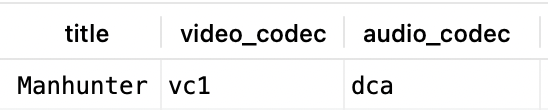
What I’m really interested in though is finding out what codecs are associated with various films. Using Manhunter for example, using a query of:

select metadata_items.title, media_items.video_codec, media_items.audio_codec
from media_items
join metadata_items
on media_items.metadata_item_id = metadata_items.id
where media_items.library_section_id = 1
and metadata_items.title = "Manhunter";

Returns values of:

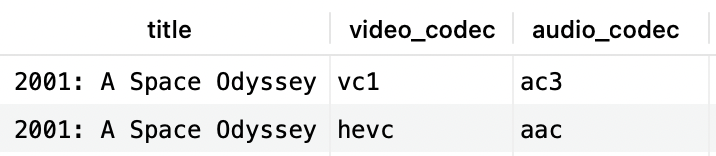
Whereas a similar query for 2001:

select metadata_items.title, media_items.video_codec, media_items.audio_codec
from media_items
join metadata_items
on media_items.metadata_item_id = metadata_items.id
where media_items.library_section_id = 1
and metadata_items.title = "2001: A Space Odyssey";

returns:

If changing the audio from DTS 5.1 to PCM fixed the buffering issue on Manhunter maybe, just maybe, that’s an issue with other films too. A quick query to find films with dcd audio:

select metadata_items.title, media_items.video_codec, media_items.audio_codec
from media_items
join metadata_items
on media_items.metadata_item_id = metadata_items.id
where media_items.library_section_id = 1
and media_items.audio_codec = "dca";

Shows a lot of films that I’ve watched without issue. Maybe it’s both the audio and video codecs that matter? Trying a query of:

select metadata_items.title, media_items.video_codec, media_items.audio_codec
from media_items
join metadata_items
on media_items.metadata_item_id = metadata_items.id
where media_items.library_section_id = 1
and media_items.audio_codec = "dca"
and media_items.video_codec = "vc1";

Also returns a lot of films I’ve successfully watched, however, “The Big Lebowski” is in this list and that never seems to work using the MKV version. I always end up using the MP4 version of the film. So, it’s possible that the films I think I’ve watched I have but only the MP4 version and not the MKV version. Maybe, if I try the MKV version they’d all fail? Time to find out.

Plex Problems

I use Plex as my back-end video serving platform. I’d love to switch to Jellyfin but not everything in the house has a Jellyfin client and I don’t want to use a mish-mash of multiple platforms because that just makes support a nightmare.

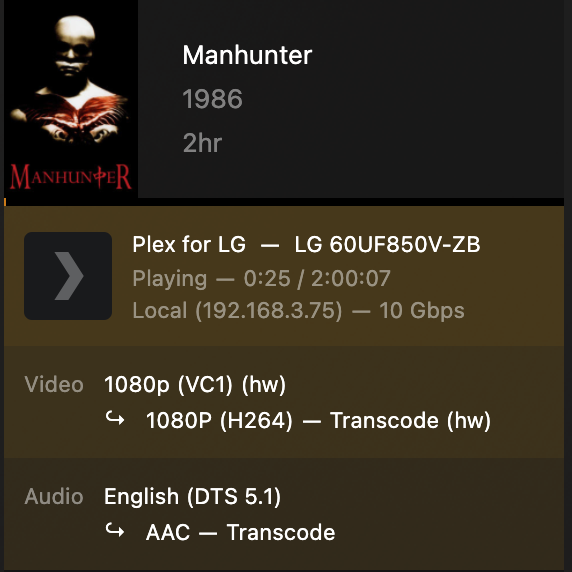
Anyhow, the other day I was watching Manhunter and it kept buffering. The TV in the back room is an old LG TV (LG 60UF850V-ZB). I know from past experience LG don’t seem to support DTS-HD MA 5.1 audio streams but, generally, I’ve not found any issues with DTS 5.1 streams. In the case of Manhunter though the stream kept buffering for no obviously good reason.

Looking at the activity in Plex I could see it was transcoding but it wasn’t making any sense as to why:

Taking a wild punt on the path of least effort, changing the audio to PCM seemed to fix the problem. and Manhunter played out just fine afterwards, no buffering or anything.